
Cuntspin casino uses a mobile number and password combination to authenticate accounts, with no email address required at any point in the process. The login form opens as a compact overlay on the homepage and adapts automatically to screen width, keeping the same layout across desktop browsers and smartphone displays. Because every account at cuntspinaus.online is tied to a unique Australian mobile number, access is straightforward as long as the registered number and credentials remain consistent.
This guide covers the full Cuntspin login sequence, what to do when access fails, how the password reset flow works via SMS, which account features require identity verification before becoming available and what steps keep an account accessible across multiple devices.
| Detail | Information |
|---|---|
| Login method | Mobile number and password |
| Password length | 6–20 characters |
| Account identifier | Australian mobile number (e.g. 61480050689) |
| Password recovery | SMS code to registered number |
| Verification required for | Withdrawals only — deposits and browsing unrestricted |
| Verification documents | ID, proof of address, proof of payment method |
| Verification processing | 24–48 hours after upload |
| Multi-device access | Supported — same credentials across all devices |
| Recommended browsers | Chrome, Safari, Firefox (latest versions) |
| Support if login fails | 24/7 live chat via bottom navigation bar |
How to log in to Cuntspin casino
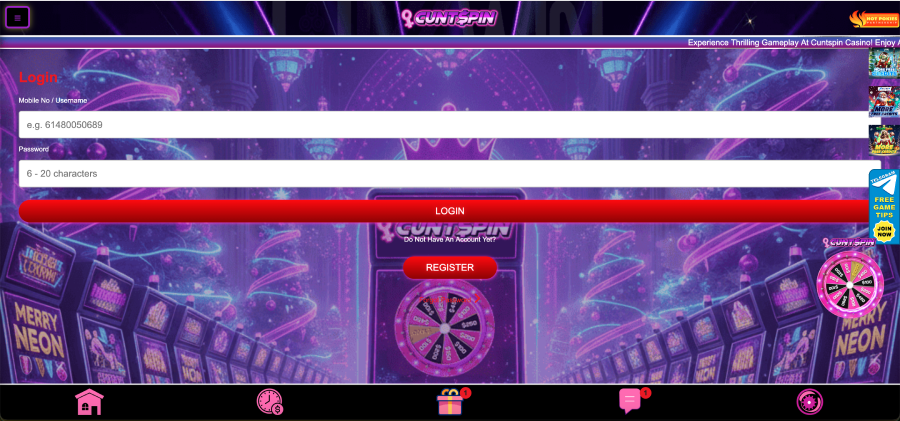
The login window at Cuntspin is accessible from the LOGIN button in the bottom-right corner of the homepage. During our hands-on session on a MacBook Air running Chrome, the overlay opened within one second of tapping the button and displayed two input fields without any additional redirects or page changes.
- Go to the official site at cuntspinaus.online
- Tap or click the LOGIN button — it sits in the bottom-right corner of the homepage on desktop, and appears as a persistent option in the mobile layout
- Enter the registered Australian mobile number in the Mobile No / Username field (example format: 61480050689)
- Enter the account password in the Password field — between 6 and 20 characters
- Press the red LOGIN button to authenticate
- The account panel loads immediately, showing balance, bonus status, payment history and full access to the game catalogue
Players without an account see a REGISTER button below the login form, which opens the SMS-based registration overlay in the same compact layout. New accounts go through a one-time verification step before the Cuntspin login credentials are confirmed and active.
What the login screen shows
The Cuntspin casino login form is minimal by design. The purple and pink background from the main homepage remains visible behind the overlay. Two labelled fields — Mobile No / Username and Password — sit above the red LOGIN button. A second prompt below the button reads "Do Not Have An Account Yet?" followed by the REGISTER option.
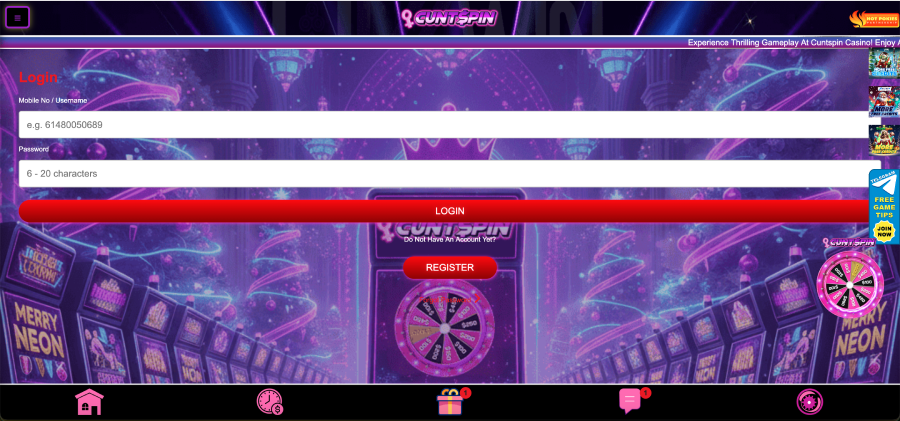
No email field, country selector or CAPTCHA appears on the form. The phone number field uses a placeholder in Australian format (e.g. 61480050689), and the password field accepts input immediately with no confirmation step required before submission. We tested the form on an iPhone 14 running Safari and found the keyboard appeared instantly on tapping either field, with no delay between input and the LOGIN button becoming active.
Fixing Cuntspin login problems
Most login failures at Cuntspin result from one of four causes: an incorrect mobile number, a password that has been auto-filled with altered characters, a browser cache conflict or a temporary lockout triggered by repeated failed attempts. Each has a direct fix that does not require contacting support.
| Problem | Likely cause | Fix |
|---|---|---|
| Login rejected immediately | Wrong phone number or password | Re-enter credentials manually without auto-fill |
| Password field shows incorrect characters | Auto-fill or caps lock active | Clear the field, disable caps lock, type manually |
| Login screen fails to load | Browser cache issue | Clear cache, switch to Chrome or Safari latest version |
| Account temporarily locked | Multiple failed login attempts | Wait a few minutes, then use Forgot Password |
| SMS code not received | SIM card inactive or network delay | Check signal, confirm number, request code again |
How to reset the Cuntspin casino login password
The Forgot Password option is accessible from the login overlay. Selecting it initiates an SMS-based reset flow that sends a verification code to the mobile number registered on the account. The process does not require the original password and completes in under two minutes provided the phone number is active and receiving messages.
- Open the login overlay at cuntspinaus.online
- Select the Forgot Password option below the password field
- Enter the registered mobile number when prompted
- Press the button to request the SMS reset code
- Enter the code received by SMS into the verification field
- Set a new password between 6 and 20 characters
- Confirm the new password and submit
- Use the new credentials to complete the Cuntspin login
If the reset SMS does not arrive within a few minutes, checking network signal and confirming that the correct number was entered resolves the majority of cases. Players who have changed their mobile number since registration and no longer have access to the original SIM should contact the 24/7 live chat for manual account recovery.
Account verification after login
Logging in to Cuntspin casino grants immediate access to the game lobby and the deposit section. Withdrawals, however, remain locked until identity verification is completed. The verification step is required once per account and applies regardless of deposit size or payment method used.
The standard document set for Cuntspin verification includes:
- A government-issued photo ID — Australian driver licence or passport
- Proof of current address dated within three months (utility bill, bank statement)
- Proof of the payment method used for deposits (masked card image or equivalent)
Documents are uploaded through the account menu after logging in. On mobile, the file picker connects directly to the phone's camera and gallery, so photos can be taken or selected without leaving the browser. Processing takes between 24 and 48 hours after submission. Once approved, the account moves to verified status and withdrawal access is released immediately.
The platform operates under a Gaming Curaçao licence, and verification is a standard compliance requirement tied to that licence. Accounts that have not verified cannot submit withdrawal requests, but depositing and playing remain fully available during the review period.
Logging in across multiple devices
Because Cuntspin account access is credential-based rather than device-bound, the same login details work across any browser on any device. We verified this during testing by logging in on a Samsung S23 and an iPhone XR using the same account within the same session — both instances showed the correct balance and bonus status without conflict.
Players who switch phones or acquire a new SIM card should update their mobile number through the account settings before the old number becomes inactive. The password reset flow and account recovery both rely on the registered number receiving SMS messages, so an inaccessible SIM creates additional steps for regaining entry.
Browser and device compatibility
The Cuntspin casino login overlay performs consistently on Chrome, Safari and Firefox running their most recent versions. During our testing across three devices — MacBook Air on Chrome, Samsung S23 on Chrome and iPhone 14 on Safari — the form loaded without delay, input fields responded immediately to typing and the LOGIN button submitted without errors.
Older browser versions may experience delayed rendering or fail to display the SMS verification prompt correctly during registration. Updating to the current browser version or switching to Chrome resolves these cases in most instances. The platform does not require a dedicated app download — all login and account functions run through the mobile browser.
Security during Cuntspin login
Login sessions at Cuntspin use encrypted communication across all fields. The SMS-based verification system means that resetting a password or creating a new account requires physical access to the registered mobile device, adding a layer of protection beyond the password alone. Repeated incorrect login attempts trigger a temporary slowdown on the account to reduce the risk of automated access attempts — this is standard behaviour and lifts automatically after a short interval.
To keep account access consistent and secure:
- Store the password somewhere offline rather than relying on browser auto-save
- Keep the registered mobile number active and associated with the account
- Avoid logging in over public or shared Wi-Fi networks
- Clear the browser cache if the login screen behaves unexpectedly
- Use the Forgot Password flow promptly if credentials are lost rather than attempting repeated guesses
FAQ
How do I log in to Cuntspin casino?
Open cuntspinaus.online, tap the LOGIN button in the bottom-right corner of the homepage, enter the registered Australian mobile number and password, then press the red LOGIN button. The account panel loads immediately after authentication.
What is the password requirement for Cuntspin login?
Passwords must be between 6 and 20 characters. The same requirement applies during both registration and password reset. No additional character type requirements (uppercase, symbols) are displayed on the login form.
What do I do if my Cuntspin login is not working?
Check that the mobile number matches the one used during registration, disable auto-fill and re-enter the password manually, clear the browser cache and try again. If the account is temporarily locked from repeated failed attempts, use the Forgot Password option to reset via SMS.
Can I log in to Cuntspin on multiple devices?
Yes. The same mobile number and password work across any browser on any device. Balance, bonus status and payment history are consistent across sessions regardless of which device is used to log in.
Do I need to verify my account before logging in?
No. Login is available immediately after registration. Account verification — which requires submitting ID, proof of address and payment method documents — is only required before the first withdrawal can be processed. Deposits and game access are available without verification.
How long does Cuntspin casino account verification take?
Verification documents are reviewed within 24 to 48 hours of upload. Once approved, withdrawal access is released and the account is fully active. The upload is completed through the account menu after logging in, using the phone's camera or gallery on mobile.
What should I do if I changed my phone number?
If the original mobile number is no longer active, the SMS-based password reset flow cannot be completed without access to that SIM. In this case, contact the 24/7 live chat support through the bottom navigation bar to begin a manual account recovery process.